
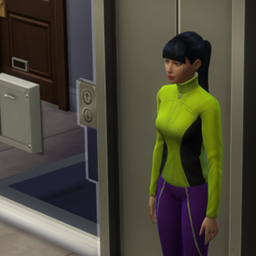
Seamless Neighborhood
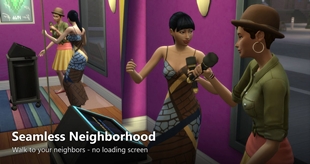
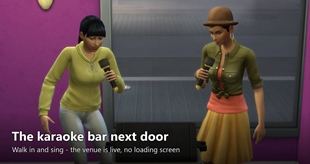
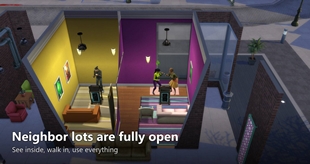
Description
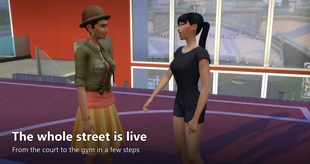
Seamless Neighborhood loads your whole street together with your lot. Your Sims walk to the neighbors, the café, the gym or the park next door, with no loading screen.
▶ Watch the uncut gameplay demo: https://www.youtube.com/watch?v=ECvrjZBhaF4
No pack required. Every installed world is supported, including San Myshuno apartments. Tested on game version 1.129.39.1030. In-game messages are in all 18 languages of the game.
What it does
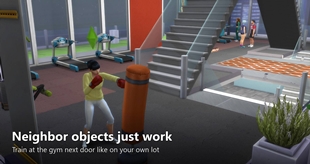
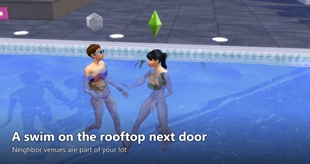
- Neighboring lots are loaded with yours: ground, houses, objects, upper floors. Click an object to use it and click the ground for "Go Here", just like at home. Stairs, pools, beds, tables and chairs all work.
- You walk instead of traveling. Travel interactions are removed for open neighbors. Long walks from one end of the street to the other are handled too.
- Ring before you go in. As in the base game, you don't just walk into a lived-in house. Use "Ring Doorbell": if a resident is home and lets you in, the house opens to you. Neighbors who gave you a key and public venues are always open.
- Real interiors. Inside a neighbor's house, the cutaway and walls-down views work as they do at home, and the view follows your Sim's floor.
- Neighbors live at home. Non-played households use their house, go to work or school and come back.
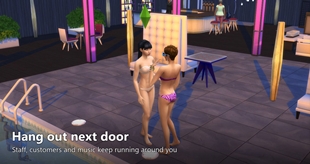
- Lively public venues. Every neighboring bar, café, gym, library, park, restaurant, karaoke bar or shop gets its own customers and staff, using the game's schedules. Visitors walk in and out from the edges of the neighborhood.
- Apartments. In a high-rise, the elevator takes you down to the street on foot. In your own building, you can visit another household's apartment (with all its furniture) once they let you in.
Installation
- In Options › Game Options › Other, enable "Custom Content and Mods" and "Script Mods Allowed", then restart the game.
- Extract the zip and put the SeamlessNeighborhood folder into
Documents/Electronic Arts/The Sims 4/Mods/, at most one folder deep. - The folder contains two files, and both are required:
SeamlessNeighborhood.ts4scriptandSeamlessNeighborhood_Strings.package.
Back up your save before you try the mod. To uninstall, delete the folder: neighboring houses stay saved in their own lot, as in the base game. To turn the mod off without removing it, create an empty file named disabled in its folder.
Good to know
- One extra loading screen when you load a save: the mod reloads the lot once so neighboring houses are drawn correctly. After that, there are no loading screens between the lots on your street.
- After a game update, the mod finds the engine functions it needs on its own. If EA changes them, the mod turns itself off safely and shows a notification. Your saves are not affected.
- Options: each option is an empty file in the mod folder, such as
all_open,no_public_venuesorapartments_closed. The full list is in the included README.txt.
Known limitations
- Sims may still take a slightly odd route on very long walks. I'll keep polishing it, along with the bugs and ideas you send me in the comments.
- Clicking a neighbor's wall or roof from outside gives "Go Here" instead of the lot menu.
- Breaking in still travels with a loading screen, as in the base game.
- Not yet tested with other script mods that change travel or lot loading.
Bug reports are welcome in the comments. Please include your game version, the world, and the file SeamlessNeighborhood.log from the mod folder.
Seamless Neighborhood is a fan-made mod. It is not made, endorsed or supported by Electronic Arts or Maxis.
Changelog
1.0.1
- New: turn the mod on or off in game with the cheat console (Ctrl+Shift+C, no cheats needed):
seamless.off,seamless.on,seamless.status. The setting is remembered. - Fixed: doors of neighboring lots and venues did not open when Sims walked through them. Doors now open and close, double doors included, in the direction the Sim walks.
- Fixed: ringing the doorbell sometimes said nobody was home while the residents were there.
- New: a resident now walks to the door to let you in, and greets you.
- Fixed: Sims sometimes went to a far away toilet on your home lot instead of the one next to them.
- Fixed: long walks across the neighborhood could zigzag.
- Fixed: turning on the
all_openoption during play now unlocks the doors right away. - Many smaller fixes and performance improvements.
1.0.0
- First release.
Français
Seamless Neighborhood charge toute la rue en même temps que votre terrain. Vos Sims vont à pied chez les voisins, au café, à la salle de sport ou au parc d'à côté, sans écran de chargement.
- Les terrains voisins sont chargés avec le vôtre : sol, maisons, objets, étages. On les utilise à la souris comme chez soi.
- On marche au lieu de voyager. Pour entrer dans une maison habitée, on sonne, comme dans le jeu de base. Les lieux publics et les voisins qui vous ont donné une clé restent toujours ouverts.
- Intérieurs : chez un voisin, la vue coupée et les murs baissés fonctionnent comme chez vous.
- Les voisins vivent chez eux, et les lieux publics voisins sont animés, avec leurs clients et leur personnel.
- Appartements : depuis un immeuble de San Myshuno, l'ascenseur descend à pied jusqu'à la rue. Dans votre immeuble, vous pouvez visiter un autre logement, meublé, si ses habitants vous ouvrent.
Installation : activez les mods de script, puis placez le dossier SeamlessNeighborhood dans Mods, à un seul niveau de profondeur. Il contient deux fichiers, tous les deux nécessaires. Aucun pack n'est requis. Le mod a été testé sur la version 1.129.39.1030. Une notice complète en français (LISEZMOI.txt) est fournie avec le mod.
Nouveautés 1.0.1 : interrupteur dans la console (seamless.off / seamless.on / seamless.status), portes des voisins qui s'ouvrent dans le sens de la marche (portes doubles comprises), sonnette corrigée, l'habitant vient ouvrir et vous salue, trajets et choix des toilettes améliorés, nombreuses petites corrections.
Mod de fan, non affilié à Electronic Arts ni à Maxis.