

Nata Living Room
Description
Nata Living Room
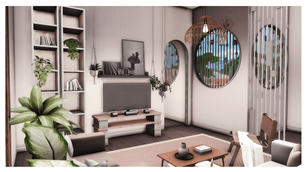
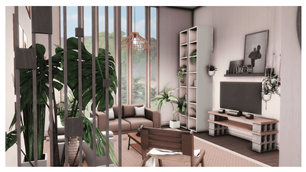
Infuse your Sims' home with the perfect balance of warmth and modern minimalism with the Nata Living Room. This space is a beautiful example of Contemporary Organic design, focusing on a soothing palette of soft pinks, rich wood tones, and crisp neutrals to create a room that feels both high-end and incredibly inviting.
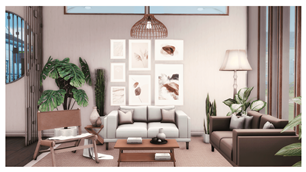
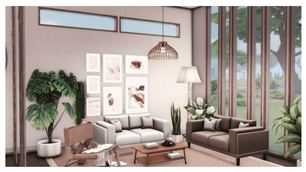
The room is centered around a gallery-style wall and features an open, airy layout that maximizes natural light. With its blend of mid-century inspired furniture and lush indoor greenery, the Nata Living Room is the ideal sanctuary for Sims who appreciate "aesthetic" living.
Design Highlights:
- Soft & Warm Aesthetic: A harmonious color palette featuring dusty rose rugs, warm oak furniture, and cream upholstery for a calming atmosphere.
- Curated Gallery Wall: A central focal point featuring a collection of minimalist botanical and abstract art prints in matching light-wood frames.
- Modern Media Hub: A stylish entertainment area with a sleek TV setup, industrial-inspired concrete block shelving, and a tall, minimalist bookcase for curated decor.
- Designer Seating: Combines a comfortable espresso-brown sofa, a structured cream loveseat, and a unique leather-accented accent chair for a sophisticated social layout.
- Organic Elements: Brimming with life, featuring oversized Monstera Deliciosa plants, snake plants, and hanging ivy to bring a fresh, natural vibe indoors.
- Architectural Lighting: Includes a statement woven-cane pendant light and a classic pleated floor lamp to provide a soft, layered glow.
Room Specifications:
- Type: Room / Living Room
- Style: Contemporary Organic / Mid-Century Minimalist / Soft Aesthetic
- Color Palette: Dusty Rose, Warm Oak, Cream, and Espresso.
Installation Instructions:
- Download the project files from the 'Files' tab.
- Unzip and place the files into your Documents > Electronic Arts > The Sims 4 > Tray folder.
- In-game, open your Gallery, navigate to "My Library," and ensure the "Include Custom Content" box is checked in the left sidebar filter.
Important Note: This room is highly detailed and relies on Custom Content (CC) to achieve its specific look. To ensure the gallery wall, unique seating, and industrial shelving appear exactly as shown, please make sure you have the required CC sets installed in your Mods folder.
- Plants Collection 2
- Simenapule - Plants Collection
- SYB_Advent2022
- SYB_Annie_Bathroom
- SYB_Arnaud_Set
- SYB_Artus_set
- SYB_Bay_House
- SYB_Corpo
- SYB_Cottage_bedroom
- SYB_Happy_Stairways
- SYB_Haussmann_set
- SYB_Maevane_set
- SYB_Millennial_part1
- SYB_Millennial_Part2
- SYB_Mozaic_Set
- SYB_New_Agnes_set
- Syboubou - Anthracite set part 2 Clutter
- Syboubou - Automne set
- Syboubou - Brigitte Living room set
- Syboubou - Raphaelle Kid bedroom set