
Hair Control
Description
⚠️ Status: TESTED & COMPATIBLE with the August 25th, 2026 Patch (PC/Mac: 1.127.41)
Hair Control
by deadlystingnyc
You're deep in a gameplay session when a townie walks by with truly catastrophic hair. Do you ignore it? You can't ignore it. Do you stop everything, open CAS, fix it, and try to remember what you were doing? Not anymore. Hair Control adds a click menu to every Sim that lets you change styles, dye hair, and - most powerfully - manage which hairstyles are allowed to appear on NPCs across your entire game.
Why You Need This
NPC hair in The Sims 4 is famously chaotic, but Hair Control isn't just a spawn fixer. It gives you precise, surgical control over any Sim's hair at any time: change the style while keeping the exact color, swap the color while keeping the style, with separate options for natural and fantasy tones, or change both color and style. No more opening CAS just to tweak one thing.
Spawn Control runs quietly in the background (enabled by default) automatically correcting NPC hair on spawn to only use styles from your whitelist. If you'd rather manage hair manually and skip the automation entirely, just toggle it off.
Getting Started
Do this first before anything else works.
- Install the mod (see Installation below)
- Launch the game and click any Sim
- Go to Hair Control → Build Hair Config
This scans your game and generates your hair whitelist. You only need to do this once. All menu options unlock after the first build. If you later install new packs or CC, run dsn_build_hair_list in the cheat console to rebuild without losing your blacklist.
⚠️ The scan can only detect hair for age and gender combinations present in the zone at build time. If your whitelist seems incomplete, make sure Sims of each age and gender are on the lot before rebuilding or use
dsn_build_hair_listwith a full household present. When in doubt, run the build again.
What You Can Do
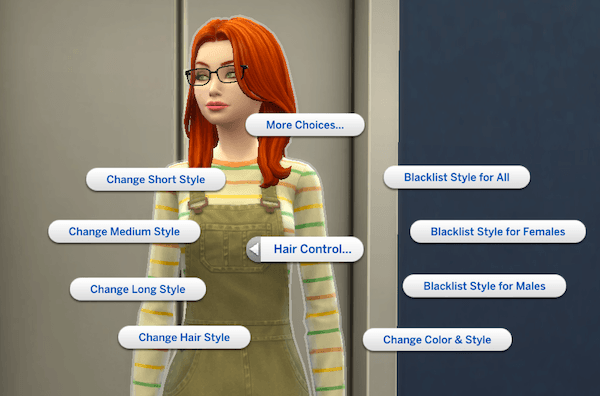
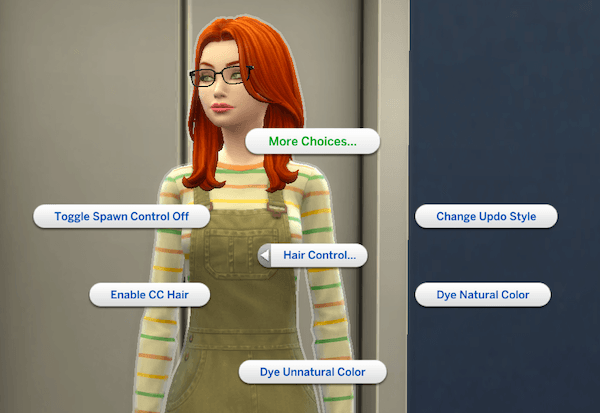
Click any Sim to open the Hair Control submenu:
| Option | What It Does |
|---|---|
| Blacklist Style for All | Removes this style from randomization and spawn control for all genders |
| Blacklist Style for Females | Removes this style for female Sims only |
| Blacklist Style for Males | Removes this style for male Sims only |
| Change Color & Style | Picks any available hairstyle at random |
| Change Hair Style | Picks a random different style, keeps the current color |
| Change Long Style | Picks a random long style, keeps the current color, current outfit only |
| Change Medium Style | Picks a random medium-length style, keeps the current color, current outfit only |
| Change Short Style | Picks a random short style, keeps the current color, current outfit only |
| Change Updo Style | Picks a random updo style, keeps the current color, current outfit only |
| Dye Natural Color | Picks a random natural color swatch, keeps the current style |
| Dye Unnatural Color | Picks a random fantasy color swatch, keeps the current style |
| Enable / Disable CC Hair | Toggles whether CC hair is included in randomization and spawn control (off by default) |
| Restore Ancestral Color | Applies the ancestral hair color fix manually; only visible on eligible Sims whose current hair color is non-compliant |
| Toggle Spawn Control | Turns automatic NPC hair correction on or off (on by default) |
Spawn Control
When enabled, NPCs that spawn wearing a non-whitelisted hairstyle are automatically switched to a whitelisted style that matches their current hair color. Sims in any player-managed household including non-active households in rotational play are never touched.
Blacklisting
Blacklisted styles are excluded from all randomization and spawn control, for all genders or a specific one. Blacklists are saved to your config file and persist across sessions and game restarts. Blacklisting works on a per-style basis, capturing all swatches for that style.
CC Hair
If you have custom content hair installed, you can choose whether it's included in the randomization pool and spawn control. CC hair is off by default. Toggle it on if you want your custom content in the mix.
⚠️ CC hair may produce unexpected results. The mod relies on swatch tags to identify natural vs. unnatural colors, but CC creators don't always tag their swatches correctly or consistently. If you enable CC hair, you may see fantasy-colored hair appear where you expected natural tones, or vice versa. Use with that in mind — and when in doubt, leave CC hair disabled.
Requirements
- The Sims 4 (base game only)
- Compatible with all packs (more packs installed means more hair variety)
Installation
- Download and unzip
deadlystingnyc_hair_control.zip - Drop the unzipped folder into your Mods folder:
Documents/Electronic Arts/The Sims 4/Mods/ - In-game, go to Game Options → Other and make sure Script Mods are enabled
- Click any Sim and choose Hair Control → Build Hair Config to finish setup
Config Files
The mod creates two files in your Mods folder alongside the .ts4script:
deadlystingnyc_hair_control.cfg: your whitelist and blacklist. You can edit this manually if needed. Format:
WF,0x000000000004c9c1   ← whitelisted for females
WM,0x000000000004c9c2   ← whitelisted for males
B,0x000000000004c9c3    ← blacklisted (all genders)
BM,0x000000000004c9c4   ← blacklisted for males only
BF,0x000000000004c9c5   ← blacklisted for females only
SPAWN_CONTROL=1         ← 1 = enabled, 0 = disabled
Unisex styles appear as both a WF, and WM, line. Blacklisting a style for females removes its WF, lines; the WM, lines remain.
deadlystingnyc_hair_control_catalog.dat: auto-generated color and age cache. Do not edit. Safe to delete if needed (it rebuilds automatically on the next zone load).
Troubleshooting
Open the cheat console with Ctrl+Shift+C, enter testingcheats true, then use:
| Command | What It Does |
|---|---|
dsn_age_toggle |
Toggles the age-based hair color filter on or off |
dsn_ancestral_toggle |
Toggles the ancestral hair color fix on or off |
dsn_build_hair_list |
Rescans your game catalog and rebuilds the whitelist (preserves blacklists) |
dsn_hair_fix_all |
Applies the standard whitelist hair fix to all eligible Sims in the save |
dsn_hair_fix_ancestral |
Applies the ancestral hair color fix to all eligible Sims in the save |
dsn_hair_log |
Prints a diagnostic snapshot to the cheat console |
dsn_hair_reload |
Clears the in-memory cache so the config file is re-read on next use |
dsn_spawn_toggle |
Toggles NPC spawn hair control on or off |
Menu options missing? Make sure you've run Build Hair Config first. Nothing else works until that step is complete.
Updated the mod or whitelist seems incomplete? Run dsn_build_hair_list with Sims of each age and gender present in the zone, then reload with dsn_hair_reload.
Having an issue? Leave a comment below with your setup and I'll help troubleshoot.
Compatibility
- No tuning overrides. Patches Python directly, making conflicts with other mods unlikely
- Compatible with CC hair (toggle it on or off from the menu)
- Safe for rotational play. Player-managed households are not affected by spawn control
🌐 Supported Translations:
French: French Translation by ElianasDiaries
Polish: Polish Translation by Aarathiel
Spanish: Spanish Translation by Monisims
Spanish: Spanish Translation by dokimtz
About This Mod
One of a growing set of mods I'm making for The Sims 4 ranging from small quality-of-life fixes to more fully featured tools like this one. If Hair Control helps make your game look the way you've always wanted, a rating helps other players find it. Thanks for the support!
If you enjoy my mods, consider supporting me on Patreon.
© 2026 deadlystingnyc. Free for personal use. Do not redistribute or reupload without permission.