
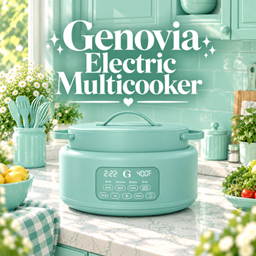
Genovia Electric Multicooker
Description
✨ GENOVIA ELECTRIC MULTICOOKER
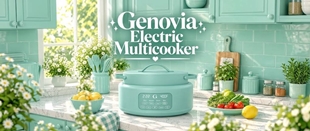
Bring a touch of colorful charm to ur Sims' kitchen with the Genovia Electric Multicooker! Featuring a cute and modern design with a sleek digital control panel and beautiful color options, this recolor is perfect for creating a cozy, stylish, and aesthetic kitchen.
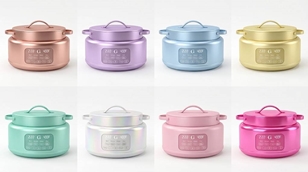
With 18 beautiful swatches to choose from, u can easily match this multicooker with ur favorite kitchen palette, from dreamy pastels and soft neutrals to rich, bold colors. Whether ur Sims love modern interiors, minimalist spaces, or pastel-inspired kitchens, this adorable little appliance will make their kitchen feel extra special! 💗
I started making custom content simply because I wanted more colorful and aesthetic objects in my own game, but I figured it would be way more fun to share them with u too! Everything I create is something I'd genuinely want in my own game, and I hope u'll love having it in urs just as much 💗
🎨 FEATURES
-
18 beautiful color swatches
-
Cute and modern electric multicooker design
-
Sleek digital control panel
-
A variety of colors to match different kitchen styles
-
Perfect for modern, cozy, pastel, and aesthetic kitchens
-
Recolor of the original mesh by Blume
-
Recolored by Genovia Studio
🎨 AVAILABLE COLORS
-
Dreamy pastel shades
-
Soft and warm neutrals
-
Fresh mint and cool tones
-
Elegant earthy colors
-
Classic dark shades
-
Bright and playful colors
-
And more!
✨ REQUIREMENTS & CREDITS
This is a recolor and requires the original mesh to work properly in ur game.
🤍 Original Mesh by Blume
https://www.curseforge.com/sims4/build-buy/blume
🎨 Recolored by Genovia Studio
Please download and install the original mesh before using this recolor. All mesh credits belong to the original creator. Please support the original creator by checking out their amazing work!
📦 INSTALLATION
-
Download the original Blume Collection from the link above.
-
Download the Genovia Electric Multicooker recolor.
-
Extract the files if they come in a ZIP folder.
-
Place the
.packagefiles in ur Mods folder:Documents > Electronic Arts > The Sims 4 > Mods -
Make sure Custom Content is enabled in ur game settings.
Enjoy decorating ur Sims' kitchens with a little extra color and charm! 💗✨