
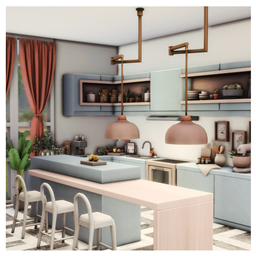
Shinta Kitchen and Dining
Description
Shinta Kitchen and Dining
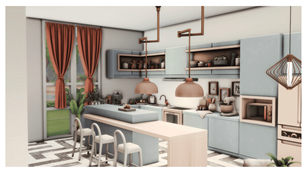
Bring a burst of playful elegance and trendy sophistication to your Sims' home with the Shinta Kitchen and Dining area. This space is a masterpiece of Soft-Contemporary design, blending a refreshing dusty blue and blush pink palette with bold geometric flooring to create a kitchen that is as much a fashion statement as it is a functional workspace.
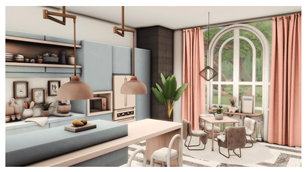
Designed with a "Pastel-Modern" aesthetic, this room features sleek, handleless cabinetry and high-end built-in appliances, making it the perfect culinary hub for the trendy, modern Sim. The integrated dining area, framed by a signature arched window, offers a cozy spot for morning coffee or intimate dinner parties surrounded by views of nature.
Design Highlights:
- Soft Pastel Palette: A harmonious combination of muted powder blue cabinetry and soft terracotta-pink drapes that create a bright, uplifting atmosphere.
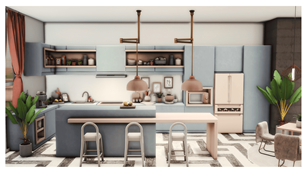
- Designer Kitchen Island: Features a substantial, minimalist blue island with a contrasting light-wood breakfast bar and sculptural white barstools.
- Bold Geometric Flooring: A striking black-and-white chevron marble floor that grounds the soft colors with a touch of high-end luxury.
- Professional Built-ins: Seamlessly integrated appliances, including a cream-toned retro-modern refrigerator and built-in microwave nook for a clean, streamlined look.
- Intimate Dining Nook: A charming dining corner featuring plush, fur-textured chairs and a minimalist square table, illuminated by a contemporary copper pendant light.
- Artistic Lighting: Stunning rose-gold pendant lights over the island and sculptural wall sconces that provide a warm, designer glow.
Room Specifications:
- Type: Room / Kitchen & Dining
- Style: Modern Pastel / Soft-Aesthetic / Contemporary Luxe
- Color Palette: Powder Blue, Blush Pink, Cream, and Charcoal.
Installation Instructions:
- Download: Ensure you download the project files from the 'Files' tab.
- Extract: Place the files into your Documents > Electronic Arts > The Sims 4 > Tray folder.
- Gallery Setup: In-game, open your Gallery, go to "My Library," and make sure the "Include Custom Content" box is checked in the filter menu to see the room.
Important Note: This room is highly detailed and relies on Custom Content (CC) to achieve its specific aesthetic. To ensure the blue cabinetry, geometric flooring, and designer furniture appear exactly as shown, please make sure you have the required CC sets installed in your Mods folder.
- Dawn Pt1
- Pralinesims - Marble Floors
- SYB_Adrienne_set
- SYB_Bubble
- SYB_Catherine_set
- SYB_Curtains_set
- SYB_Faveo
- SYB_Happy_Stairways
- SYB_HauteCuisine
- SYB_Imperium_set
- SYB_Nuage_set
- SYB_Quadratura_set
- SYB_ReadyOrNot
- Syboubou - How about tea set
- Syboubou - MinimalSIM - Minimal liv
- Syboubou - Pink October set