
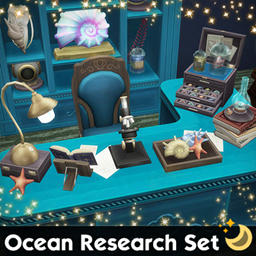
Ocean Research Set
Description
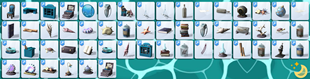
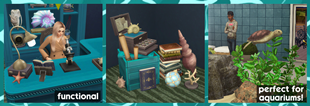
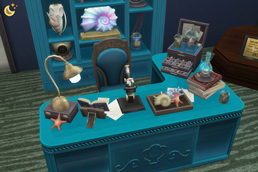
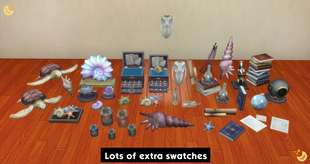
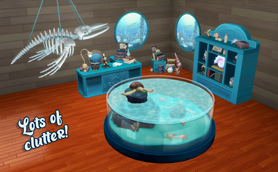
54 Maxis Match items for your research lab or aquarium! Tabletop items can be placed on any surface, wall items can go on any wall or door, all items can be placed or the floor/ground.
✨ More aquarium-related CC linked below item list!
✨ More Aquarium-Related CC Coming Soon!
- Always suggested: bb.moveobjects ON (it makes placing items wherever you want much easier)
- Use the scale up & scale down feature on your keyboard to make the items larger or smaller to your liking. If you have a non-US keyboard, it may be different keys depending on which alphabet it uses.
- Raise & lower objects with the 0-9 keys (if you want them in a place other than a surface's slot or the ground)
- For further tweaking options, check out the TOOL mod!
- Ammonite: 5 swatches
- Big Stack Books: 1 swatch
- Books on Stand: 1 swatch
- Coral on Stand: 6 swatches
- Crate With Scrolls: 1 swatch
- Diving Helmet Model: 1 swatch
- Fish Fossil Display : 1 swatch
- Giant Seashell 1 & 2 (2 items for lying down and standing upright): 5 swatches each
- Glass Float: 3 swatches
- Hanging Skeleton Long & Short (2 items): 4 swatches each
- Jar 1-5 (5 items): 2 swatches each
- Lab Desk: 8 swatches
- Lab Desk Chair: 1 swatch
- Lamp on Box: 1 swatch
- Large Lustrous Ammonite Display: 3 swatches for base
- Lustrous Ammonite: 1 swatch
- Lustrous Ammonite on Stand: 1 swatch
- Message in a Bottle (2 items for standing up and lying down versions): 1 swatch each
- Microscope: 1 swatch
- Model Submarine: 1 swatch
- Ocean Bones & Ocean Bones Wall Decor (2 items): 3 swatches each
- Ocean View Lab Window (faux window): 4 swatches for glass transparency and frame
- Oil Lamp: 1 swatch
- Oil Lamp on Books: 1 swatch
- Paper Clutter 1 & 2 (2 items): 1 swatch each
- Research Materials: 1 swatch
- Scrolls (2 versions for lying down and standing upright): 1 swatch each
- Seashell Organizer 1 & 2 (2 items): i swatch each
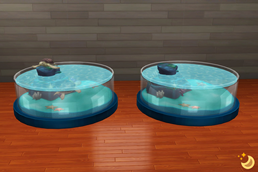
- Sea Tank (empty): 3 swatches for base
- Sea Treasures: 5 swatches
- Sea Turtle 1 & 2 (2 items): 1 swatch each
- Sea Turtle Tank: 3 swatches for base
- Seaweed Decor: 2 swatches
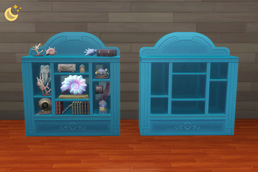
- Shelves: 2 swatches
- Shelves (no clutter & slotted): 2 swatches
- Single Book (2 versions for upright and lying down): 3 swatches each
- Smaller Seashell 1 & 2 (2 items for lying down and upright versions): 5 swatches each
- Starfish: 8 swatches
- Tray of Treasures: 3 swatches
- Wooden Box: 3 swatches
✨ Aquarium Set 1 is here!: https://www.curseforge.com/sims4/build-buy/aquarium-set-1
✨ Aquarium Set 2 is here!: https://www.curseforge.com/sims4/build-buy/aquarium-set-2
✨ Aquarium Set 3 is here!: https://www.curseforge.com/sims4/build-buy/aquarium-set-3
✨ Aquarium Set 4 is here!: https://www.curseforge.com/sims4/build-buy/aquarium-set-4
✨ Aquarium Set 5 is here!: https://www.curseforge.com/sims4/build-buy/aquarium-set-5
✨ Seashells Set is here!: https://www.curseforge.com/sims4/build-buy/seashells-set
Remember to check out the rest of my CC!: https://www.curseforge.com/members/simdertalia/projects
Follow me! ❤️ https://bio.link/simdertalia
I hope you enjoy!
Any community support helps me to manage my chronic pain & chronic illness, & I'm forever grateful! ❤️ (Ko-Fi)
WCIF (where can I find) Friendly! If there is something in one of my preview images that you want for your game, and you don't know where to find it, just ask! 💗
& Please tell me in the comments if there is something that your sims need! If it's something I'm able to do I'd love to make it
⭐️ If you are having issues in game with any build/buy CC, check if you are using DX11, and if you are, run the DX11 batch fix with Sims 4 Studio. (Content management → Batch Fixes → Misc. → Update Images for DX11) It is very easy, and will fix any CC for this that might have been needed.
To see if you are using DX11:
- Open The Sims 4.
- Go to Options Menu → Game Options → Graphics.
- Look for the “Renderer” or “Graphics API” option.
- If it says DirectX 11, then you’re using DX11.
- On some versions, this option may automatically be set based on your system and not displayed explicitly.