
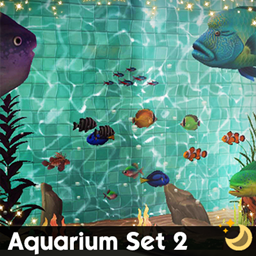
Aquarium Set 2

Description
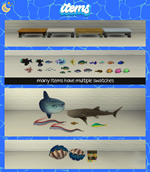
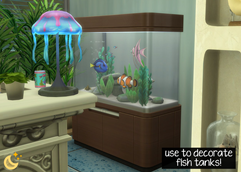
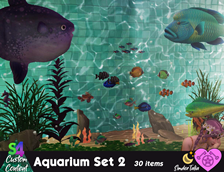
30 Maxis Match decors of aquatic creatures (and a few other things), with lots of swatches! Can be placed on any floor/ground and raised to desired height with 9 keyboard key (0 to lower again). Display fish can be placed on any surface or floor/ground. Bench can go on any floor/ground.
✨ More aquarium-related CC linked below item list!
✨ More aquarium-related CC coming soon!
- Always suggested: bb.moveobjects ON (it makes placing items wherever you want much easier)
- Use the scale up & scale down feature on your keyboard to make the items larger or smaller to your liking. If you have a non-US keyboard, it may be different keys depending on which alphabet it uses.
- Raise & lower objects with the 0-9 keys (if you want them in a place other than a surface's slot or the ground)
- For further tweaking options, check out the TOOL mod!
- Angelfish: 3 swatches
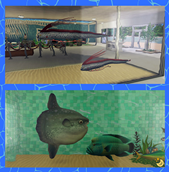
- Barreleye FIsh: 2 swatches
- Barreleye Fish Display: 2 swatches
- Bench: 4 swatches
- Beta: 9 swatch
- Bitterling: 3 swatches
- Bluegill : 1 swatch
- Blue Tang: 7 swatches
- Clownfish: 1 swatch
- Dark Sleeper: 1 swatch
- Giant Clam 1: 5 swatches
- Giant Clam 2: 5 swatches
- Guppy: 7 swatch
- Humphead Wrasse: 1 swatch
- Japanese Flounder: 4 swatches
- Luna Lionfish: 1 swatch
- Mahi Mahi: 1 swatch
- Neon Tetra: 4 swatches
- Neon Tetra Group: 4 swatches
- Oarfish 1: 5 swatches
- Oarfish 2: 5 swatches
- Ocean Sunfish: 4 swatches
- Oriental Butterfly Fish: 9 swatches
- Pale Chub: 6 swatches
- Piranha: 1 swatch
- Striped Beakfish: 1 swatch
- Tilapia: 4 swatches
- Treasure Chest: 2 swatches
- Whale Shark: 1 swatch
✨ Aquarium Set 1 is here!: https://www.curseforge.com/sims4/build-buy/aquarium-set-1
✨ Aquarium Set 3 is here!: https://www.curseforge.com/sims4/build-buy/aquarium-set-3
✨ Aquarium Set 4 is here!: https://www.curseforge.com/sims4/build-buy/aquarium-set-1
✨ Aquarium Set 5 is here!: https://www.curseforge.com/sims4/build-buy/aquarium-set-5
✨ Seashells Set is here!: https://www.curseforge.com/sims4/build-buy/seashells-set
✨ Ocean Research Set is here!: https://www.curseforge.com/sims4/build-buy/ocean-research-set
Remember to check out the rest of my CC!: https://www.curseforge.com/members/simdertalia/projects
Follow me! ❤️ https://bio.link/simdertalia
I hope you enjoy!
Any community support helps me to manage my chronic pain & chronic illness, & I'm forever grateful! ❤️ (Ko-Fi)
WCIF (where can I find) Friendly! If there is something in one of my preview images that you want for your game, and you don't know where to find it, just ask! 💗
& Please tell me in the comments if there is something that your sims need! If it's something I'm able to do I'd love to make it
⭐️ If you are having issues in game with any build/buy CC, check if you are using DX11, and if you are, run the DX11 batch fix with Sims 4 Studio. (Content management → Batch Fixes → Misc. → Update Images for DX11) It is very easy, and will fix any CC for this that might have been needed.
To see if you are using DX11:
- Open The Sims 4.
- Go to Options Menu → Game Options → Graphics.
- Look for the “Renderer” or “Graphics API” option.
- If it says DirectX 11, then you’re using DX11.
- On some versions, this option may automatically be set based on your system and not displayed explicitly.